

Disclosure: this article contains an affiliate link. If you buy through it, we may earn a commission.
An AI app backend platform like NoCodeBackend acts as the automated infrastructure that connects your user interface to a functional database. It removes the need for you to manually build server-side logic, providing pre-configured APIs and database structures so your application can store, retrieve, and manage data without writing custom code.
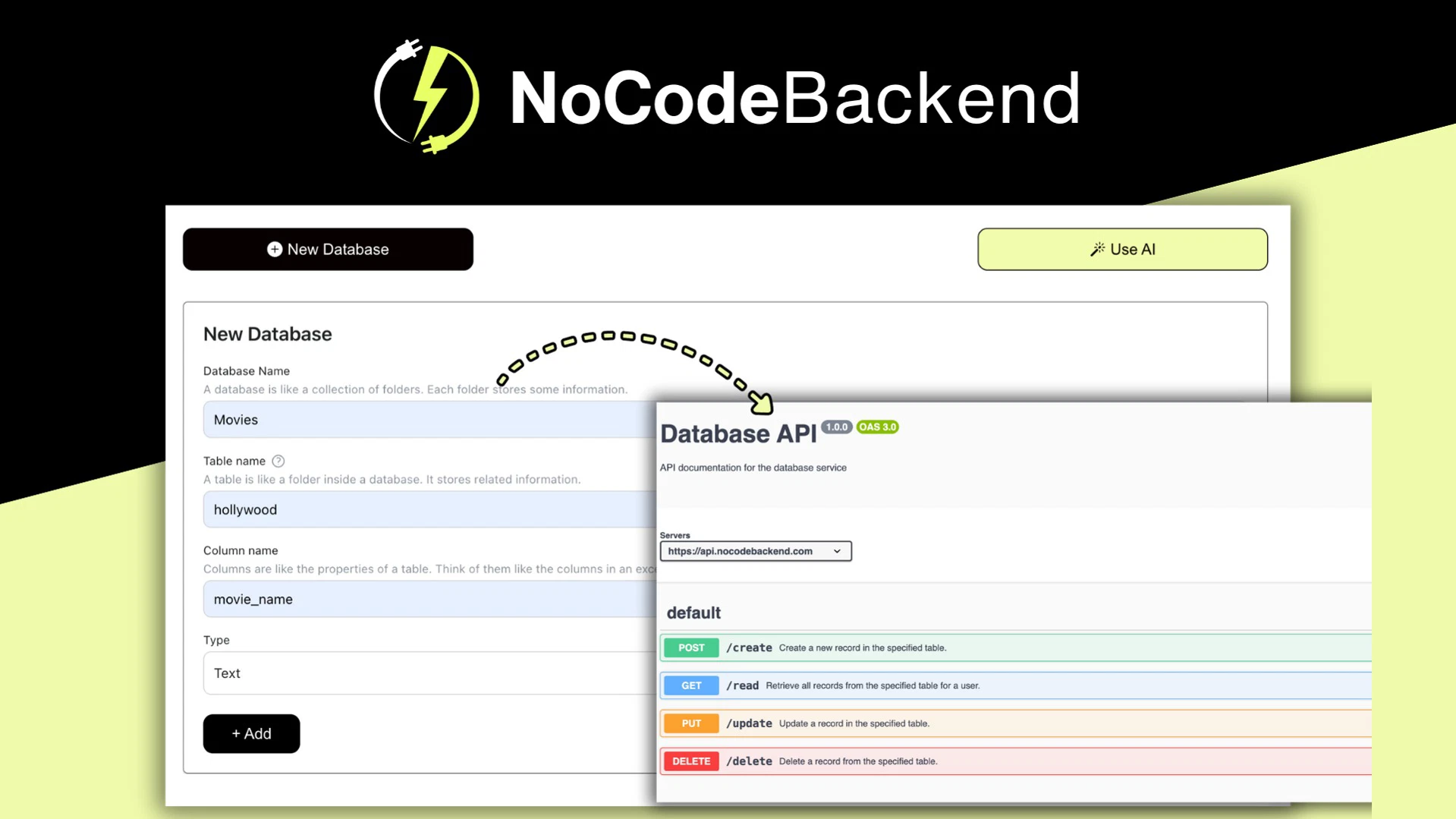
How the backend platform works for developers

When you build an app using AI coding tools, the interface often comes together quickly, but the backend—the part that saves and serves data—can become a roadblock. This platform is designed to bridge that gap by handling the heavy lifting of database management and API creation automatically.
The core value lies in its ability to automate the technical setup that usually requires a developer. By providing lifetime access to these tools, it allows creators to focus on the user experience and the specific AI features of their application. You don’t have to worry about configuring servers or writing complex backend scripts.
Automatic API Documentation
Creating API documentation is time-consuming. NoCodeBackend eliminates this manual work by generating documentation automatically as you define your data structures.
Database changes automatically update your documentation. This prevents errors caused by stale documentation. This keeps development moving for small teams.
REST APIs for Databases
The platform generates REST APIs for every database. A REST API is a standard way to exchange database information. The platform creates these endpoints automatically.
In practical terms, this means your AI-generated front-end can immediately begin saving user profiles, storing content, or logging activity.
Choosing the Right AI App Backend Platform
This tool is built for non-technical founders, designers, and creators who use AI tools to generate the visual or functional parts of an app but find themselves stalled by backend requirements. It’s particularly useful for building directory-style applications or content-heavy apps where the primary goal is to store, list, and filter data.
However, it isn’t a one-size-fits-all solution for every type of software. If you’re building an app that requires complex, high-frequency real-time processing or highly specific custom server-side logic, you might find that an automated platform feels too rigid.
Things to Consider Before Starting
Evaluate your data architecture control needs. Check if the platform meets non-standard database needs. Automated backends follow a set structure for ease of use.
Another factor is your long-term roadmap. Since the platform provides lifetime access, it can be a cost-effective way to support a project for years. However, you should ensure that the platform supports the scale of data you expect your application to handle.
Comparing Backend Strategies

To understand if this approach is right for you, look at how it compares to manual development or using a managed database service.
| Feature | NoCodeBackend | Traditional Development |
|---|---|---|
| Setup Time | Minutes | Days or Weeks |
| Coding Required | None | High |
| API Creation | Automated | Manual |
| Documentation | Auto-generated | Manually written |
| Flexibility | Standardized | Unlimited |
If your goal is to launch quickly with a functional MVP (Minimum Viable Product), the automated route is usually the better choice. If your product is a deep-tech solution that requires custom server hardware or unique proprietary protocols, you’ll likely need to hire a developer to build a custom backend from scratch.
Related guides
Frequently Asked Questions

Does this platform require any coding knowledge?
No, it’s specifically designed for users who don’t want to write backend code. The platform automates the creation of APIs and database structures, allowing you to build your app’s logic through the provided interface rather than by typing out server-side scripts or configuring network protocols yourself.
Can I use this for any type of app?
It’s best suited for directory-style apps, content platforms, and standard data-driven applications. If your app requires highly complex real-time processing, specialized hardware access, or non-standard server logic, you should verify if the platform’s automated features can accommodate your specific requirements before you start building your project.
What happens if I need to change my database structure?
The platform is built to handle updates automatically. When you modify your database, the REST APIs and the generated documentation update to match those changes. This keeps your front-end and back-end in sync without you needing to manually rewrite your API documentation or adjust the connection logic every single time.
Is this a good choice for a professional agency?
It can be a useful tool for agencies that need to prototype apps quickly for clients. Because it provides lifetime access and automates the initial setup, it allows teams to deliver a functional backend in a fraction of the time it would take to build a custom system, though you should assess the limits of the platform first.
How do I connect my front-end to the backend?
You connect your app using the REST APIs generated for your database. The platform provides auto-generated documentation detailing the exact addresses and request formats needed for your front-end to communicate with your data storage.
Why does my app sometimes fail to communicate with the database?
If your front-end loses its connection, the issue is likely a mismatch between your database structure and the API endpoints. The platform generates these APIs automatically, so any schema changes require your front-end to update accordingly. Always check your documentation to ensure field names and types match your requests.
How do I handle large amounts of data with this tool?
Manage large datasets by planning your database schema to keep related information logically grouped. You should structure entries to facilitate easy filtering and consider splitting data across multiple smaller databases if your app design requires complex queries that could overwhelm a single table.
| Data Scenario | Recommended Approach | Why it Matters |
|---|---|---|
| User Profiles | Dedicated User Database | Keeps authentication data separate from content. |
| Directory Listings | Categorized Database | Makes it faster to filter and retrieve specific items. |
| Activity Logs | Separate Event Database | Prevents log data from slowing down core app queries. |
| Global Settings | Centralized Config Database | Ensures consistent behavior across your entire app. |
What are the limits of lifetime access?
Lifetime access provides ongoing use of the platform’s features for the service’s existence without recurring subscription payments. You should review the platform’s terms to understand specific project limitations. Note that you must still ensure your application remains compliant with all platform usage policies.
Can I migrate my data away from this platform later?
You can generally export your information if you need to switch providers because the platform uses standard REST APIs. Before starting, verify the export options available within the platform’s interface to ensure you can move your data if your long-term needs change.
Are there specific AI tools that work better with this backend?
This backend is compatible with any AI coding tool that can generate standard HTTP requests. Because it relies on REST APIs, the specific AI assistant or code generator you use to build your front-end doesn’t matter, provided it follows standard web communication protocols.
How do I troubleshoot an API request that returns an error?
If an API request returns an error, first check the status code to identify the problem. A 404 error typically indicates an incorrect endpoint address, while a 403 suggests a permissions issue. Always cross-reference your app’s URL with the platform’s auto-generated API documentation to resolve typos.
What if I need to share my API with other developers?
Sharing your API is simple because the platform generates documentation for you.
This is particularly useful if you’re working on a team where one person is handling the design and another is handling the logic. As long as you don’t change the API structure without updating the documentation, your team can work independently without needing to constantly ask for clarification on how the data is stored or accessed.
Can I use this for a mobile app?
Yes, you can use this backend for mobile applications as well as web apps. The platform provides REST APIs, which are the standard way for mobile apps to communicate with servers. Your iOS or Android app will send requests to the API endpoints and receive data in a format your code can parse.
Final Thoughts
The key to mobile development with this platform is ensuring that your network requests are handled asynchronously. Mobile apps shouldn’t block the main screen while waiting for an API response. Ensure that your mobile development environment is set up to handle these requests in the background so that your user interface remains fast and responsive. Since the API is standard, you can use any HTTP library available for your chosen mobile development framework to communicate with your database.


